Red Hat Family Summary

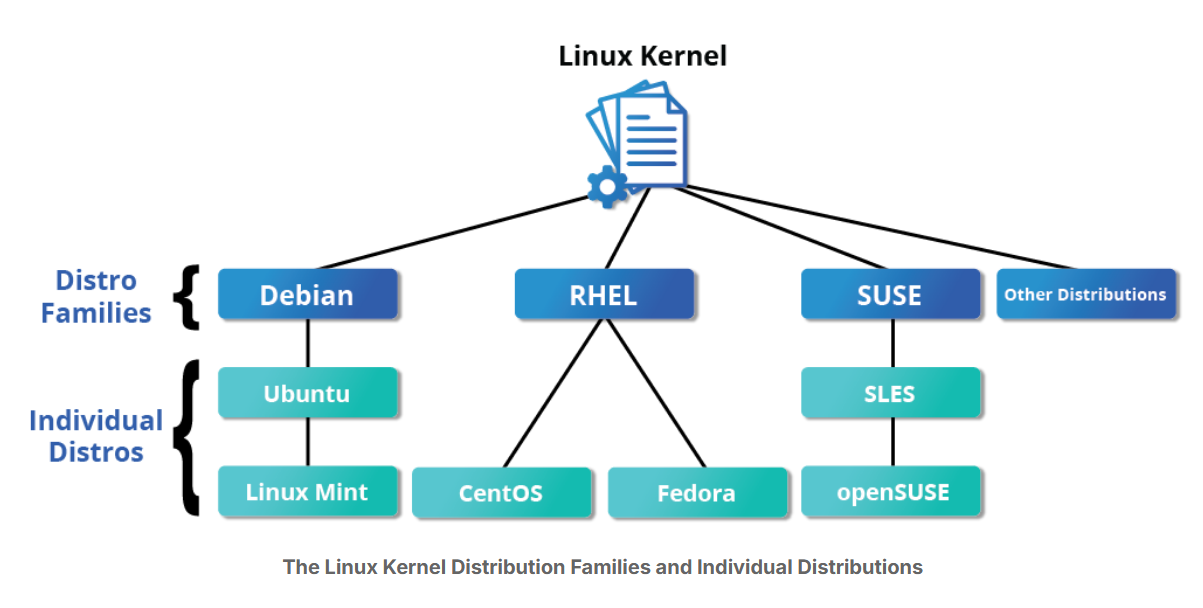
🟦 1. Debian Family
Examples: Ubuntu, Linux Mint, Kali Linux
Package Format:
.debPackage Manager:
APT(Advanced Package Tool)Key Features:
Known for stability and large software repositories
Focused on community support and open-source purity
Commonly used for servers, desktops, and development
🟥 2. Red Hat Family
Examples: Red Hat Enterprise Linux (RHEL), Fedora, CentOS, Rocky Linux, AlmaLinux
Package Format:
.rpmPackage Manager:
YUM/DNFKey Features:
Designed for enterprise and corporate environments
Offers commercial support and certified software
Fedora acts as a testing ground for new RHEL technologies
🟩 3. SUSE Family
Examples: openSUSE Leap, openSUSE Tumbleweed, SUSE Linux Enterprise Server (SLES)
Package Format:
.rpmPackage Manager:
zypper/YaST(Yet another Setup Tool)Key Features:
Focused on enterprise stability and system administration tools
YaST provides a powerful graphical configuration tool
Preferred in European enterprise and server environments
🔴 Red Hat Family Summary
Head of the family: Red Hat Enterprise Linux (RHEL)
Members: Fedora, CentOS, CentOS Stream, and Oracle Linux
🧠 Key Points
Fedora
Community-driven and includes more software than RHEL.
Acts as a testing platform for future RHEL releases.
Releases new versions every ~6 months.
RHEL (Red Hat Enterprise Linux)
Stable, commercial version used in enterprise environments.
Focused on reliability and long-term support.
CentOS
Free version, identical to RHEL, used for servers and labs.
CentOS 8 ended updates after 2021.
CentOS Stream
Replaces traditional CentOS.
Gets updates before RHEL (while old CentOS got them after).
Free to use and suitable for learning and demonstrations.
Oracle Linux
- RHEL-compatible enterprise OS developed by Oracle.
🟥 Key Facts About the Red Hat Family
Fedora serves as the upstream testing platform for Red Hat Enterprise Linux (RHEL) — new features are tested in Fedora before reaching RHEL.
CentOS is a close clone of RHEL, designed for users who need RHEL’s stability without commercial support. It became part of Red Hat in 2014.
Supports multiple hardware platforms, including x86_64, ARM, and PowerPC.
Uses DNF, an RPM-based package manager, to install, update, and remove software packages.
RHEL is widely used in enterprises that host and manage their own servers, offering strong security, stability, and support.
🟩 Key Facts About the SUSE Family
The relationship between SUSE Linux Enterprise Server (SLES) and openSUSE is similar to that of RHEL, CentOS, and Fedora in the Red Hat family.
openSUSE serves as the community-driven, free version, while SLES is the enterprise, commercially supported version.
openSUSE is used as the reference distribution for the SUSE family because it is freely available to end users.
Since openSUSE and SLES are very similar, knowledge and tools from one can be applied to the other with minimal differences.
The SUSE family emphasizes stability, enterprise management tools (like YaST), and strong system administration capabilities.
🟦 Key Facts About the Debian Family
The Debian family is upstream for Ubuntu, and Ubuntu serves as the upstream for Linux Mint and other related distributions.
It uses the DPKG-based APT package manager (
apt,apt-get,apt-cache, etc.) to install, update, and remove packages.Ubuntu has become one of the most widely used distributions for cloud deployments and servers.
While Ubuntu is built on Debian and uses GNOME as its base desktop environment, it differs visually and functionally from standard Debian and other
The Linux Foundation and Linux Distribution Families
The Linux Foundation is the umbrella organization for many critical open-source projects used across industries.
Its mission goes beyond Linux, promoting innovation across all layers of the software stack.
Linux Foundation training is community-driven, distribution-flexible, and technically advanced, developed with Linux community leaders.
There are three major Linux distribution families: Red Hat, SUSE, and Debian.
This course uses representative members from each family to teach practical skills. derivatives due to its unique interface and user experience enhancements.
Three Important Contexts for Linux Learning
Linux is constantly changing
Linux evolves rapidly at both the technical (kernel) and distribution/interface levels.
Course material is current as of release, but new features or changes may not be covered.
Repetition is intentional
Some topics are revisited to reinforce learning, especially system configuration tasks like using
sudo.Repetition helps students perform practical tasks without needing to search earlier sections.
Avoiding “holy wars”
Linux and open source communities have strong preference disagreements (e.g., emacs vs. vi, GNOME vs. KDE).
The course chooses one option for simplicity, not to suggest superiority—e.g., focusing on GNOME due to its larger user base.
Linux History Overview
Linux is an open-source operating system, originally developed for Intel x86-based PCs.
Over time, it has been ported to a wide range of hardware, from embedded devices to the world’s largest supercomputers.
Linux started as a personal project by a Finnish college student and has grown into a global, collaborative effort with massive impact on modern computing.
Linux History
In 1991, Linus Torvalds, a student in Helsinki, Finland, began developing his own operating system kernel.
He assembled the essential components around his kernel to form a functioning operating system, which became the Linux kernel.
In 1992, Linux was re-licensed under the GNU General Public License (GPL), allowing it to grow a global developer community.
By combining the Linux kernel with GNU project components, developers created complete Linux distributions, which started appearing in the mid-1990s.
More About Linux History
Mid-1990s: Linux distributions provided the foundation for free (freedom-focused) computing and fueled the open-source software movement.
1998: Major companies like IBM and Oracle announced support and invested in Linux development.
Today: Linux is everywhere:
Powers over half of Internet servers
Runs the majority of smartphones via Android
Handles over 90% of public cloud workloads
Drives all of the world’s most powerful supercomputers
Linux Philosophy Overview
Every successful project needs a guiding philosophy—Linux is no exception.
Linux is constantly improved and maintained by a global network of developers, collaborating over the Internet.
Linus Torvalds leads the project, but anyone with technical skill, willingness to contribute, and ability to collaborate can participate.
This open, collaborative philosophy has been key to Linux’s rapid growth and widespread adoption.
Linux Philosophy
UNIX Influence: Linux is heavily inspired by UNIX but is not UNIX itself.
Free and Open Source: Designed as a free alternative to UNIX, which was expensive and built for more powerful computers.
Hierarchical Filesystem: Files are stored in a hierarchical structure with the root (
/) at the top.Everything as a File: Processes, devices, and network sockets are often represented as file-like objects, allowing standard utilities to interact with them.
Multitasking & Multiuser: Linux supports simultaneous execution of multiple threads and multiple users.
Networking and Daemons: Built-in networking capabilities and background service processes (daemons) are integral to the system.
Linux Community Overview
The Linux community is a valuable resource for solving problems and learning, even for non-developers.
Ways to engage include:
Posting queries on relevant discussion forums
Subscribing to discussion threads
Joining local Linux user groups in your area
The community embodies collaboration, support, and shared knowledge, helping users tackle challenges and improve skills.
Linux Community – Extended Overview
The Linux community is a global ecosystem of developers, system administrators, users, and vendors.
Popular ways to connect include:
IRC software (e.g., WeeChat, HexChat, Pidgin, XChat)
Online forums and discussion boards, including Linux User Groups (local and online)
Collaborative projects on GitHub and GitLab
Newsgroups and mailing lists, such as the Linux Kernel Mailing List
Community events, like Hackathons, Install Fests, Open Source Summits, and Embedded Linux Conferences
linux.com (hosted by The Linux Foundation) is a major portal, serving over one million visitors per month, offering:
News
Community discussions
Free tutorials and tips
Linux Distributions Overview
When building a product for Linux, it’s important to ensure it works across widely used distributions.
This requires learning about the different components, services, and configurations associated with each distribution.
Understanding distributions helps you develop, test, and deploy software effectively in diverse Linux environments.
Linux Distributions
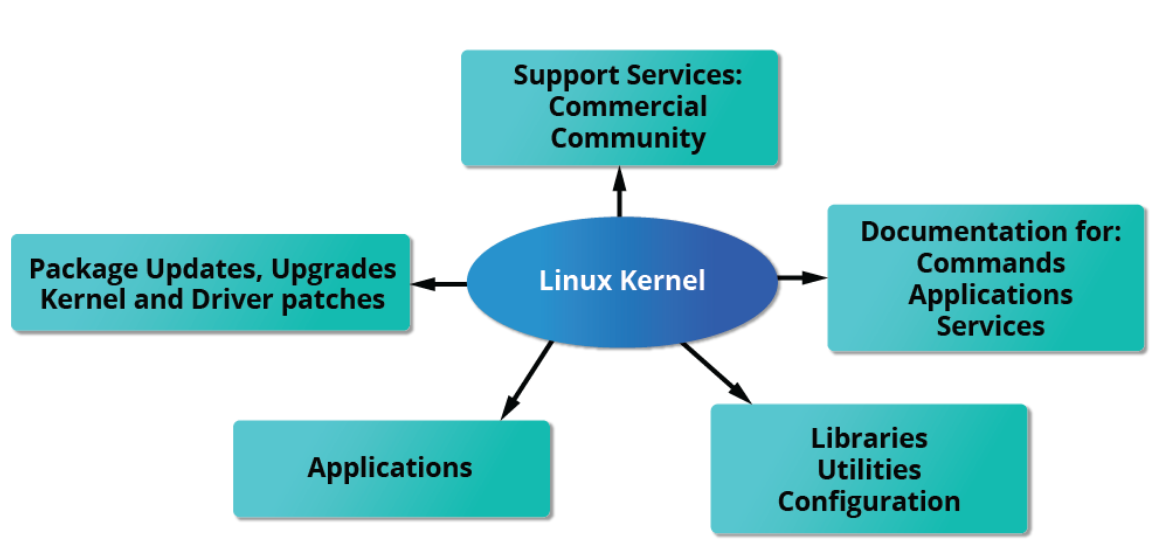
A Linux distribution combines the Linux kernel with a set of software tools to form a complete operating system.
These tools handle tasks such as file operations, user management, and package management, and are often separate projects maintained by different developers.
Kernel versions vary by distribution:
Example: RHEL 8 uses kernel 4.18 (stable), while RHEL 9 uses 5.14 (newer features).
Distributions may incorporate newer kernel improvements into older, stable kernels.
Essential components of distributions include:
Compilers (C/C++, Clang)
Debuggers (gdb)
Core system libraries
Low-level graphics interfaces
Desktop environments
Package management systems for installing and updating components
Distributions also come with a complete suite of preinstalled applications, making them ready to use out of the box.
Services Associated with Linux Distributions
Different distributions cater to different audiences, from individual users to large organizations.
Commercially-supported distributions like Red Hat, SUSE, and Ubuntu are preferred by companies, government, and enterprises.
Free alternatives like CentOS, CentOS Stream, AlmaLinux, and Rocky Linux are widely used by organizations comfortable without paid support.
- Note: CentOS traditional releases ended in 2021, replaced by CentOS Stream.
RHEL variants (CentOS, AlmaLinux) are binary-compatible with RHEL, allowing software to install across distributions seamlessly.
Ubuntu and Fedora are popular among developers and educational institutions.
Commercial distributors provide:
Long-term support (LTS)
Hardware/software certification
Regular updates for security, bug fixes, and performance
Online support resources
Summary – Key Concepts
UNIX Influence: Linux borrows heavily from UNIX, leveraging its design principles.
Files as Interfaces: Many Linux features and services are accessed through files or file-like objects.
Multitasking & Multiuser: Linux is fully multitasking and multi-user, with built-in networking and daemon services.
Global Development: Linux is developed by a loosely connected global network of developers, led by Linus Torvalds; technical skill and a desire to contribute are the main requirements.
Linux Community: A far-reaching ecosystem of developers, vendors, and users supports and advances Linux.
Key Terminology: Important terms include kernel, distribution, boot loader, service, filesystem, X Window System, desktop environment, and command line.
Distributions: A Linux distribution combines the kernel with various tools for file operations, user management, and package management, creating a complete operating system.